
Install in 30 seconds.
SlapChan isn't on the Mac App Store yet, so macOS will show a security warning on first launch. This is normal — and takes about half a minute to clear.
Six clicks. Then forever.
- 1
Download & drag
Download SlapChan and drag it to your Applications folder.
- 2
First launch
Double-click SlapChan. You'll see a warning — click 'Done' or 'Cancel'.
- 3
Open System Settings
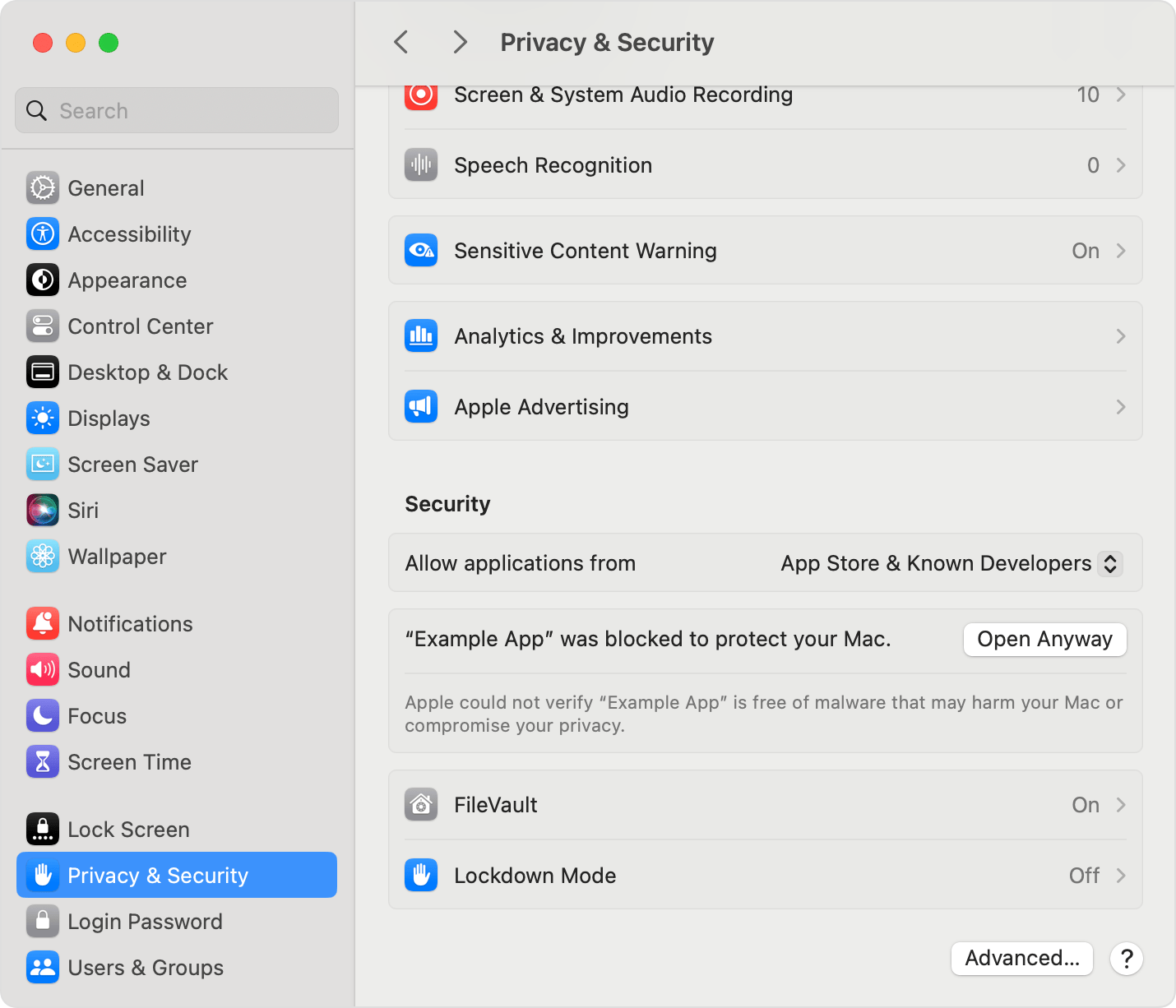
Go to → System Settings → Privacy & Security.
- 4
Find the Security section
Scroll down. You'll see: "SlapChan was blocked to protect your Mac."
- 5
Click 'Open Anyway'
Hit the button next to the message. macOS will ask once more — confirm.
- 6
Enter your password
Type your Mac password. Done — SlapChan opens normally from now on.
This only happens once. After that, SlapChan opens like any normal app — silently into your menu bar at 12 MB.
⚡ Developer / Terminal InstallOptional · bypasses all manual security steps
If you prefer, copy-paste this into Terminal:
$ curl -sL https://raw.githubusercontent.com/Amit-0905/slapchan/main/install.sh | bashBypasses the manual security steps entirely. Script source is open on GitHub. Questions? support@slapchan.in
Lifetime access
for the price of a coffee.
First 50 users get SlapChan forever for $3.99 — paste code FIRST50 at checkout. After that, it's back to $6.99.